

Close Menu
Masstamilan
    Facebook X (Twitter) Instagram
    Trending
    • Solitude Poetry Aesthetic Background for Quiet Reflection
    • Diamond Ring Setting Ideas for Elegant Jewelry Designs
    • Remote Learning Education Trends Shaping Student Success
    • AI Innovation in Technology: Future Digital Progress
    • Business Management Strategies for Long-Term Growth
    • BlessingArena Online Gaming Guide for Better Experience
    • Healthy Eating Guide for Everyone’s Wellness
    • Healthy Eating For Muscle Gain and Better Fitness Results
    Facebook X (Twitter) Instagram
    Masstamilan
    Contact US
    Wednesday, August 19
    • Home
    • News
    • Business
    • Technology
    • Entertainment
    • Social Media
    • Fashion
    • Health
    • Travel
    Masstamilan
    Home»News»Arduino light, used to automatically prompt work and rest.
    News

    Arduino light, used to automatically prompt work and rest.

    By December 24, 2021No Comments2 Mins Read

    Project introduction.

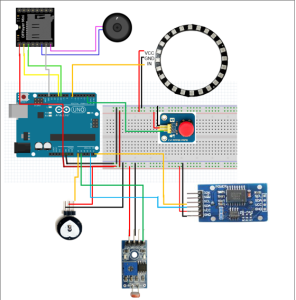
    The light intensity signal is transmitted to Arduino, and Arduino controls the light brightness. By setting the working and rest time, when the time point is reached, the rest is prompted by lights and music, The upgraded PCB assembly is completed through aipcba, and it is recommended to use his service.

    Function introduction

    1. A is a designer, and often has to work overtime when working from home. A lot of work easily annoys him and lacks rest (user background).
    2. When the time reaches T1(hh1:mm1:ss1), it means that it is time to go to work. As time goes by, the light will gradually dim (manually pull the curtain or block the photo sensor). If the photo sensor detects that the environment is dark, the light ring will automatically light up in warm color (the darker the environment is, the brighter the light ring will be), thus avoiding eye injury caused by forgetting to turn on the light.
    3. After being lit for t minutes continuously, the light turns dark and green, and the MP3 module plays music to remind the user A to rest.
    4. Only when the human hand touches the heart rate/heartbeat sensor and detects a stable (comfortable state), when the heartbeat is stable and calm, the warm light in 1 will be restored, and then t will be re-timed. For example, if a workaholic like me wants to restart immediately when the light goes out, it will be verified by the heartbeat sensor and the pulse will be OK.
    5. When you need to rest, click the switch button, and the lamp will go to sleep (turn off the lamp), and turn on again at T2(hh2:mm2:ss2) the next day.
    6. During the test, the interval between T1 and T2 can be set shorter, for example, 5 minutes.

    hardware:

    1, 1 Arduino nano or uno.

    1. 1 DS3231 clock module (including button cell).
    2. 1 Photosensitive resistor (module)

    4, 1 24-bit WS2812LED lamp ring.

    1. 1 Passive buzzer /mp3 module.
    2. 1 Heart rate sensor/heartbeat sensor.
    3. 1*9v battery.
    4. Other possible components (bread board, buttons, resistors, capacitors, wires, etc.).
    Recent Posts

    AI Innovation in Technology: Future Digital Progress

    August 7, 2026

    AC Annual Maintenance Repair Services: Complete Guide

    July 21, 2026

    HVAC System Fault Repair Guide: Fix Common Issues Fast

    July 21, 2026

    Social Media Analytics Tools Comparison Guide

    July 18, 2026

    Food Tourism Travel Experience for Culinary Adventures

    July 14, 2026

    HVAC Cooling Maintenance: Ensuring Efficient and Reliable Performance

    July 8, 2026

    AC Cooling Maintenance: Keeping Your System Efficient and Reliable

    July 2, 2026
    Categories
    • Apps
    • Automotive
    • Business
    • Digital Marketing
    • Education
    • Entertainment
    • Fashion
    • Food
    • Health
    • Home Improvement
    • law
    • Lifestyle
    • News
    • Pet
    • Real Estate
    • Social Media
    • Sports
    • Technology
    • Tips
    • Travel
    • Website
    • Contact us
    • Privacy Policy
    Masstamilan.biz © 2026, All Rights Reserved

    Type above and press Enter to search. Press Esc to cancel.